Titanium vs Phonegap vs Native application development
The development for Android and iOS requires obtaining the respective SDKs. On iOS, this means learning Objective-C and also learning Cocoa Touch. Android programming is very similar to Java, but with Android-specific APIs and frameworks. In addition to the native application development for these platforms, there are also several third party APIs that can assist in the development process. There are several options to choose from for mobile development:
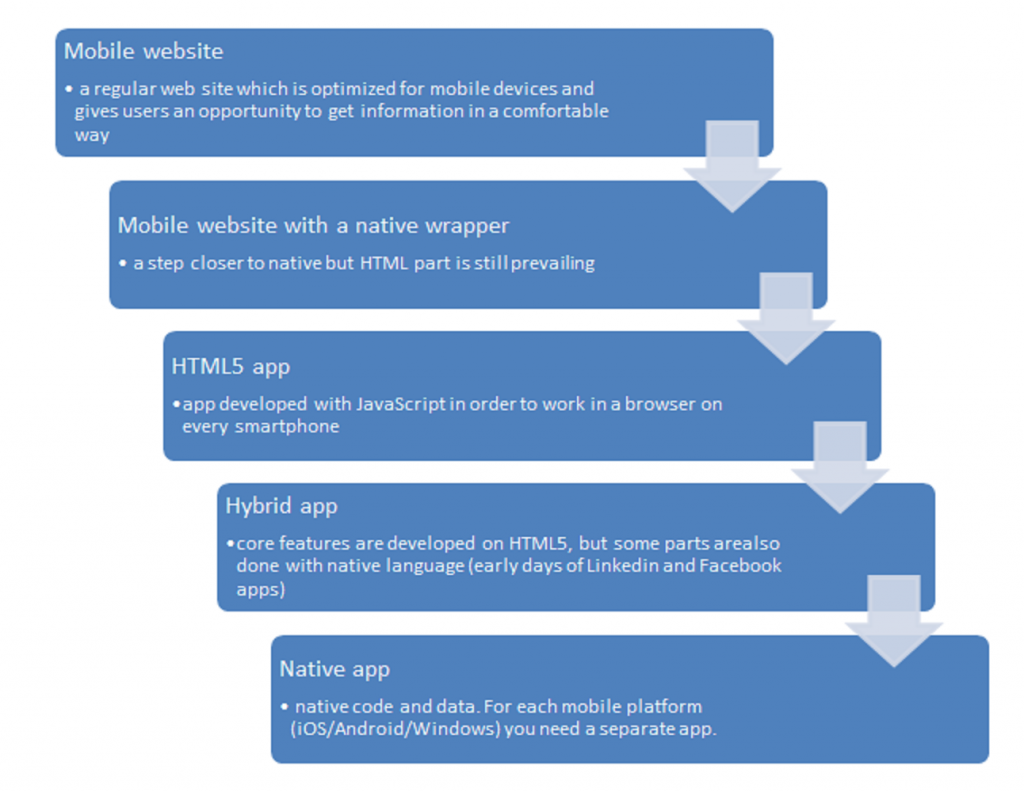
Speaking of mobile websites, their advantages are quite obvious: Mobile Website runs on all mobile devices because it’s based on web technologies and does not depend on the OS of a mobile device. At the same time, a mobile website wouldn’t have access to all device features and has to work within the limited capabilities.
In this post I will be talking about mobile applications and briefly discuss about the available APIs for development as well as their pros and cons.
1. Native application development [iOS SDK][Android SDK] Xcode is the official toolset provided by Apple for any Mac and iOS development. Google recommends using Eclipse for development on Android [see this]. iOS development requires familiarity with Objective C [see this]. Although, its syntax is quite different from other traditional programming languages like Java and C++, it is not very difficult to get on with. Android development is based on Java and comparatively easier for programmers with previous experience with Java.
Advantages
- The native applications allow the full use of the device capabilities which might be missing in other third party APIs.
- It is easier to get good performance for the application when programming using native SDKs.
Disadvantages
- Requires learning different languages for development on different platforms.
- The code base developed for one platform cannot be easily adapted for another platform.
2. PhoneGap Using PhoneGap, developers can build applications using HTML/CSS/JS, including JavaScript classes that give access to device hardware and other iOS API featurs like contacts, filesystem, camera, microphone, GPS, etc. The final application is wrapped within a platform native ‘Web View’ browser object, and essentially becomes a stand-alone web application with the ability to access some device- specific features.
Advantages
- One can use plain old Javascript or even other libraries like jQuery, Prototype, Sencha Touch, MooTools, etc to handle the interaction.
- Allows the development for several platforms at once, e.g. Android, iOS, Windows etc.
Disadvantages
- The applications are web applications inside a Web-View. Browser performance doesn’t come close to native application component performance.
- Not all device APIs would be available for the applications.
3. Titanium Using Titanium, developers can create an application writing Javascript and calling Titanium’s APIs. The Javascript is then interpreted at runtime. The application’s UI becomes completely native. There is no web UI in your app since the native Titanium APIs take over control of all UI needs. Titanium runs application’s JavaScript using one of two JavaScript interpreters’ JavaScriptCore on iOS (the interpreter used by Webkit) and Mozilla Rhino on Android.
The Javascript calls to the Titanium API are mapped to native code in the Titanium framework and generate native components. Events in those components are sent back to the code in Javascript where we can handle them. The end result is a relatively fast performance.
Advantages
- Titanium provides good performance (by using the native components) whilst having a simple and powerful API that gives access to most interface elements either iOS and Android has.
- Allows the development for several platforms at once, e.g. Android, iOS, Windows etc.
Disadvantages
- (For web developers) Using HTML or CSS is no longer possible as it doesn’t use Web-View for deploying the application. Using external Javascript libraries that work with DOM is not possible (as there is no DOM).
- The performance still lacks behind what you can obtain using native SDKs.
EDIT: Personally, I have worked with both Titanium and Native application development for iPhone and Android. Although, Titanium is good for developing applications quickly, I wouldn’t recommend it for a sufficiently complicated application specially if it focuses a lot on hardware features. Before beginning the development on an application, I would analyze all requirements for the application and choose among one of the three because they all have their own advantages. For someone looking to quickly decide on one of these, here are some quick points:
- You are a web developer and want to make a simple app that serves as a mobile front-end of a web service with not a lot of processing/complex UI on the Front-end. USE TITANIUM
- You want to make something that will handle a lot of images and use the device camera. NATIVE DEVELOPMENT
- You are developing only a user interface and don't have to use heavy processing/device features. USE TITANIUM
- You want to customize your application heavily. NATIVE DEVELOPMENT
These are not comprehensive set of points and as I pointed out, each application needs a detailed study about the features that it will have and the capabilities of the framework. It depends on a lot of factors: your goal, your business, your budget, your audience. This list could go on and on. Don’t rush into the decision. Its difficult and costly to switch the framework after you begin developing.